
Inbox
The Inbox collects what you should see. The number next to it in the sidebar counts what you have not read.
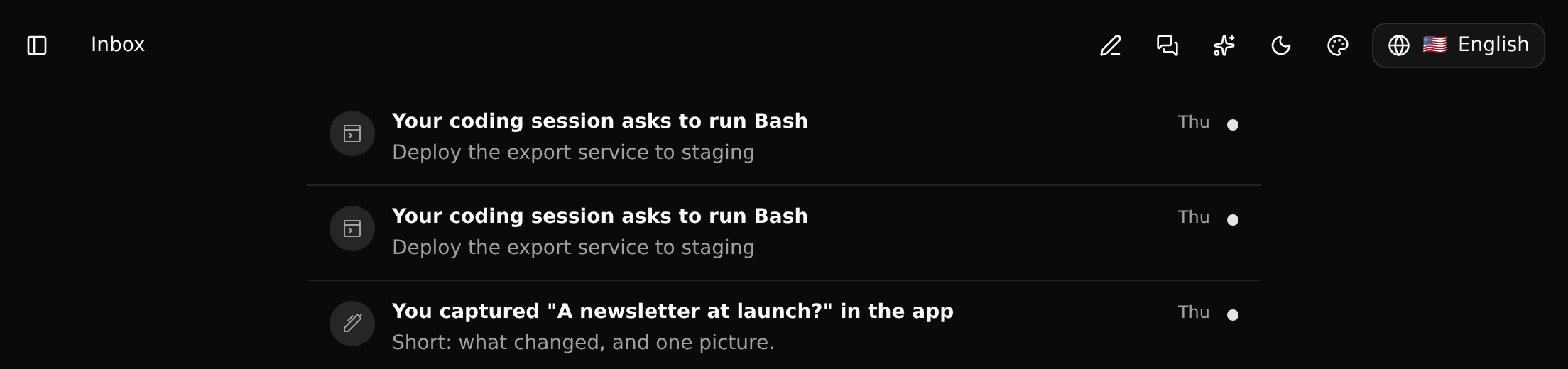
Click an item to open what it is about. That also marks it read.
What arrives there
| Item | When |
|---|---|
| A mention in chat | Somebody wrote @you in a message |
| A mention in a text | Somebody wrote @you in a description or a document |
| Membership | You were added to the workspace, or your own role changed |
| A shared branch | Somebody shared a branch with you, or changed your role on it. Opening it goes to the branch |
| Invitation accepted | Somebody you invited joined |
| Merge request | A member asks you to merge their branch (see Merging) |
| A workflow's message | A workflow ran its Send to Inbox step (see Steps and functions) |
| An agent's message | An agent sent you something through the MCP server |
There is one item per thing: being mentioned again in the same message, or a workflow sending under the same key again, makes the existing item unread again instead of piling up copies.
Yours only
Nobody else sees your Inbox, and nobody else can mark your items read or remove them. Items are not part of any branch: they are never committed, merged or shipped.